How to Find Your Bybit UID - Complete Guide 2026
TetherSave
••☕3 min read

📚 Browse by Category
What is Bybit UID?
Bybit UID (User ID) is a unique identifier to distinguish each user on the Bybit platform. Simply put, it functions like a social security number on the platform.
When You Need UID
- TetherSave payback service integration
- Referral change requests
- Customer support inquiries
- Event participation
How to Find UID on PC (Website)
Method 1: Check from Profile
- Go to Bybit official website (bybit.com) and log in.
- Click the profile icon in the upper right corner.
- Your Bybit UID is displayed at the top of the dropdown menu.
- Click the copy icon next to the UID to copy it.
Method 2: Check from Account & Security
- After logging in, click the profile icon in the upper right.
- Click [Account & Security] from the dropdown menu.
- You can find your UID number on that page.
How to Find UID on Mobile App
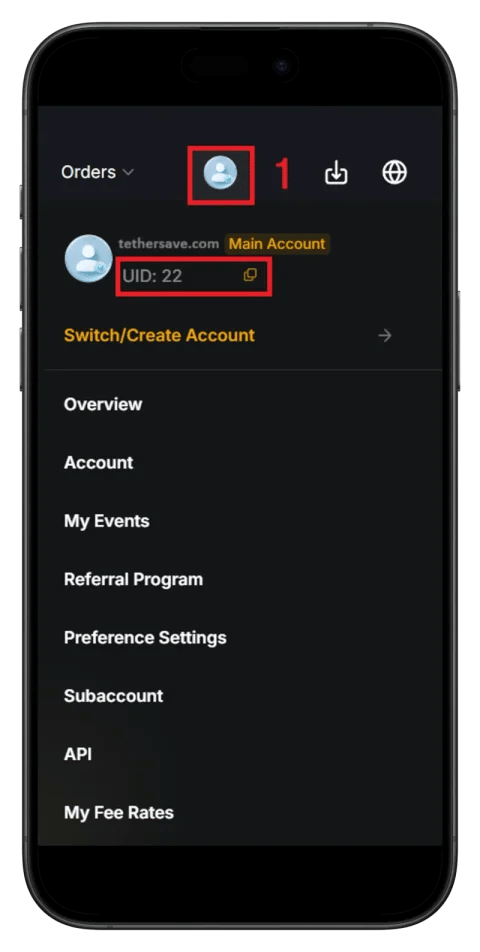
Method 1: Check from Profile
- Launch the Bybit app and log in.
- Tap the profile icon in the upper left.
- Your UID is displayed on the profile screen.
Method 2: Check from Assets Tab
- Tap the [Assets] tab in the Bybit app.
- You can find your UID number at the top of the screen.
Connect to TetherSave Payback
Once you've found your UID, you can connect to TetherSave payback service:
- Go to TetherSave My Page → Exchange Connection menu
- Select Bybit
- Enter your confirmed UID
- Connection complete!
You can receive up to 40% payback on trading fees through Bybit.
Important Notes
- UID consists of numbers only.
- UID is required for referral changes and various applications.
- While sharing UID itself is safe, never share your password or verification codes.
References