
WEEX UID Check Guide - 2026 Complete Guide
TetherSave
••☕2 min read

📚 Browse by Category
How to Check WEEX UID
This guide shows how to check your UID (User ID) on WEEX.
UID is a unique identifier required for TetherSave cashback service.
UID Check Steps
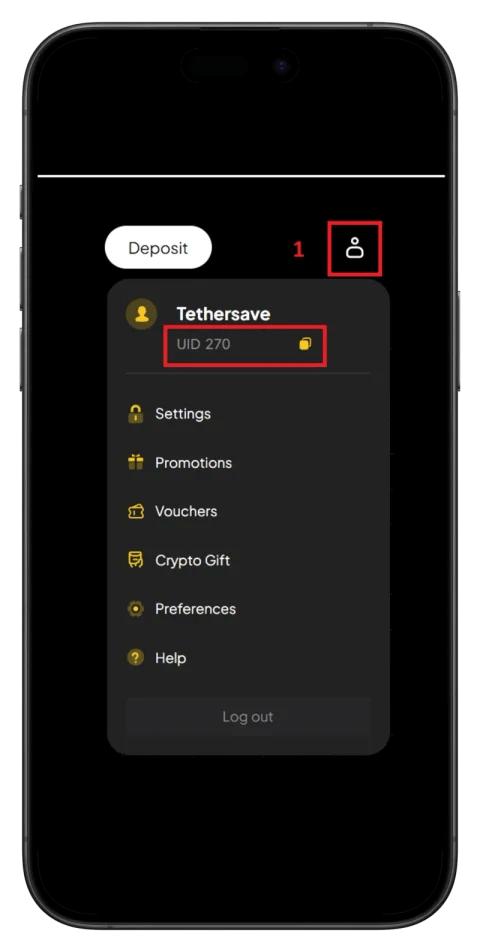
Step 1: Click Profile Icon
After logging into the WEEX app, click the profile icon in the top right.
Step 2: Check UID
When the profile menu opens, the UID is displayed directly below your nickname.
Click the copy icon to copy the UID to clipboard.
Register UID on TetherSave
- Log in to TetherSave
- Go to My Page → UID Management
- Select WEEX
- Enter and register the copied UID
After registration, you can receive up to 40% cashback on fees every time you trade on WEEX!
FAQ
Q. Where is UID used?
UID is used for TetherSave cashback service connection, customer support inquiries, event participation, etc.
Q. Is it safe to share my UID?
The UID itself is safe to share.
However, never share your password or verification codes.
Written as of 2026.