Hur du hittar ditt WOO X UID - Komplett guide 2026
TetherSave
••☕3 min läsning

📚 Bläddra efter kategori
Vad är WOO X UID?
WOO X UID (Användar-ID) is a unik identifierare assigned to your WOO X Konto. Each user has an Konto with a UID, through which user balances are recorded.
When You Need UID
- TetherSave payback service integration
- Campaign participation (WOO X UID submission krävs)
- Security Verifiering for Konto recovery
- DeFi wallet connection
Hur man hittar UID on PC (Website)
Method 1: Check from Konto Info Page
- Gå till WOO X official website (woox.io) and log in.
- Click the user icon in the upper right corner.
- Navigate to the Konto Info page.
- You can find your UID on that page.
Method 2: Check from SubKontos & API
- After logging in, click the user icon.
- Select [SubKontos and API] from the dropdown menu.
- You can find the Application ID (UID) in the Konto Management section.
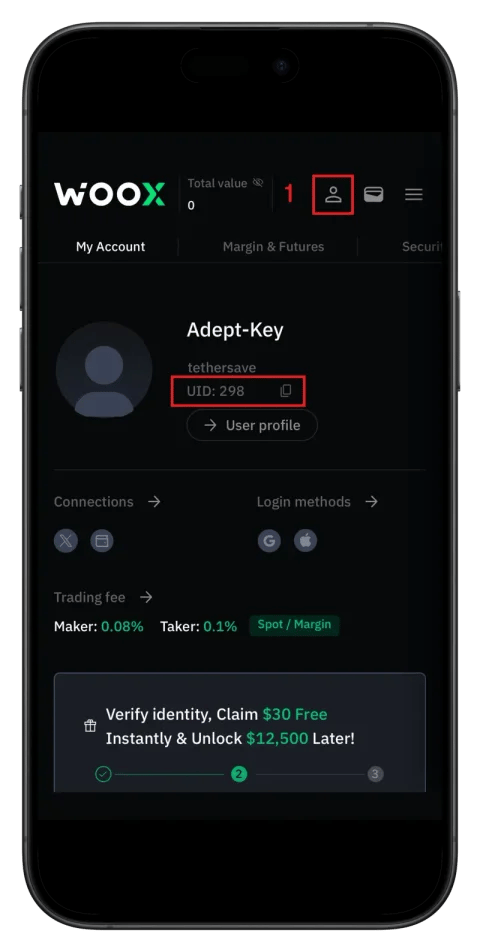
Hur man hittar UID on Mobile App
- Launch the WOO X app and log in.
- Navigate to Kontoinställningar or Profil menu.
- You can find your UID in the Konto Info section.
Viktiga anteckningar for UID Usage
- You must submit your WOO X UID when participating in campaigns.
- Only one wallet address can be connected to one WOO X UID.
- When recovering your Konto, if you lose your registered email or password, UID is used for identity Verifiering.
Connect to TetherSave Payback
Once you've found your UID, you can connect to TetherSave payback service:
- Gå till TetherSave My Page → Exchange Connection menu
- Select WOO X
- Enter your confirmed UID
- Connection complete!
Viktiga anteckningar
- When connecting DeFi wallet to WOO X Konto, proceed through the Konto Info page.
- While sharing UID itself is safe, never share your password or Verifiering codes.
References