WEEX Sign Up Guide 2026 - Complete Guide Including Cashback Integration

📚 Browse by Category
WEEX Sign Up Complete Guide 2026
Looking for how to sign up for WEEX?
This article provides a detailed guide on the latest WEEX registration process in 2026, KYC identity verification, and TetherSave cashback integration, with actual screenshots.
WEEX Sign Up Requirements
1. Email Address or Phone Number
- A valid email or phone number is required for WEEX registration
2. ID Document (for KYC Verification)
- Passport (Recommended)
- Driver's License
- Identity Card (Resident registration card)
- Residence Card (Alien registration card)
3. Smartphone
Required for ID photo capture and Liveness Check.
WEEX Sign Up Steps (Step-by-Step Guide)
Step 1: Access TetherSave Exclusive Sign Up Link
👉 Create TetherSave Cashback Account
👉 Go to WEEX Exchange Details Page
Signing up through this link automatically connects TetherSave cashback benefits.
Step 2: Enter Email and Verification
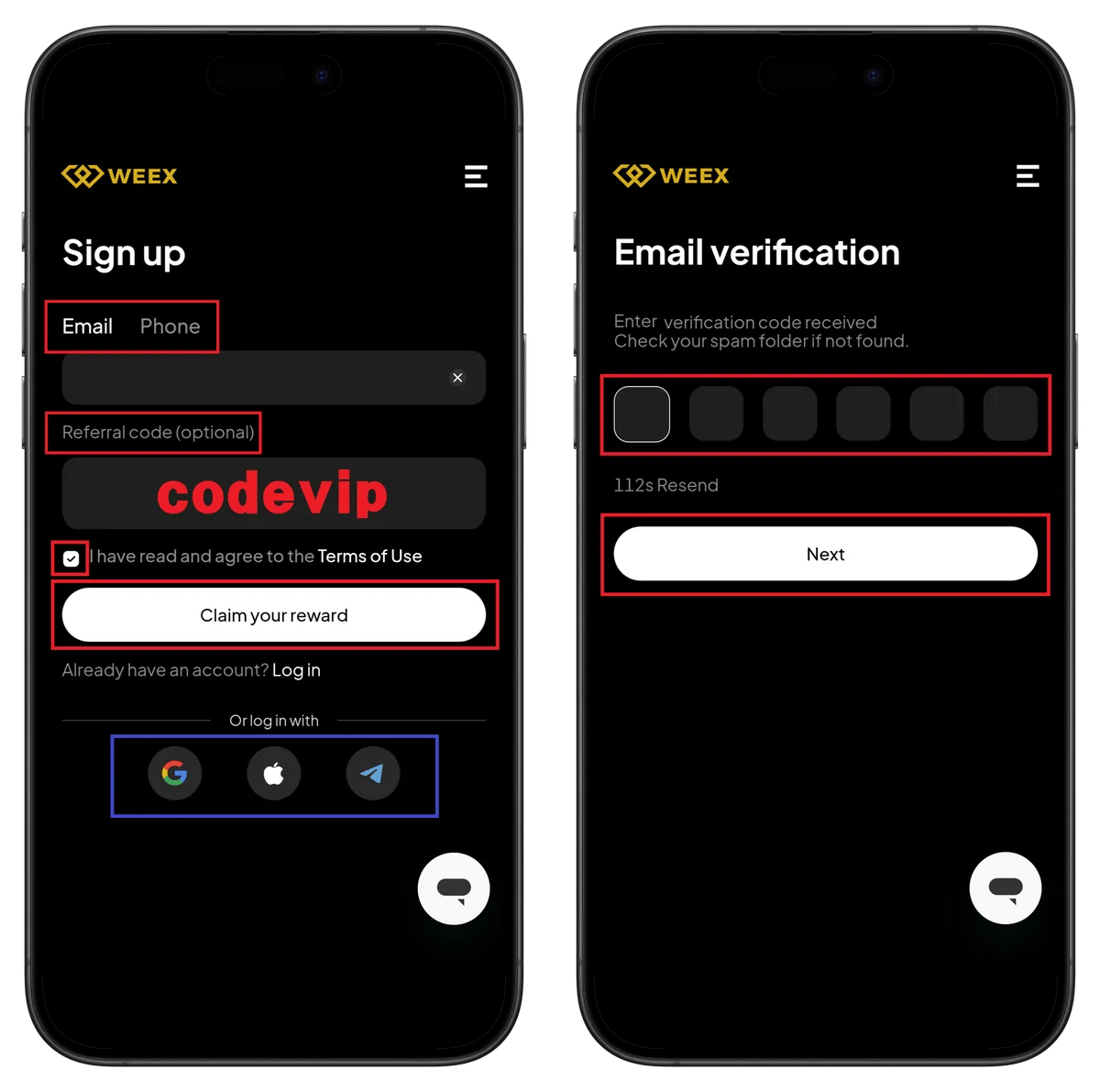
Left Screen - Sign up:
- Select Email or Phone tab.
- Enter your email address.
- Referral code (optional) - Please verify referral code vipsave!
- Check Terms of Use agreement.
- Click Claim your reward button.
- You can log in via Already have an account? Log in link.
- You can also sign up with Google, Apple, or Telegram.
Right Screen - Email verification:
- Enter the verification code in the Enter verification code received field.
- Check the Check your spam folder if not found notice.
- 112s Resend - Resend wait time is displayed.
- Click Next button.
Step 3: Set Password and Start KYC
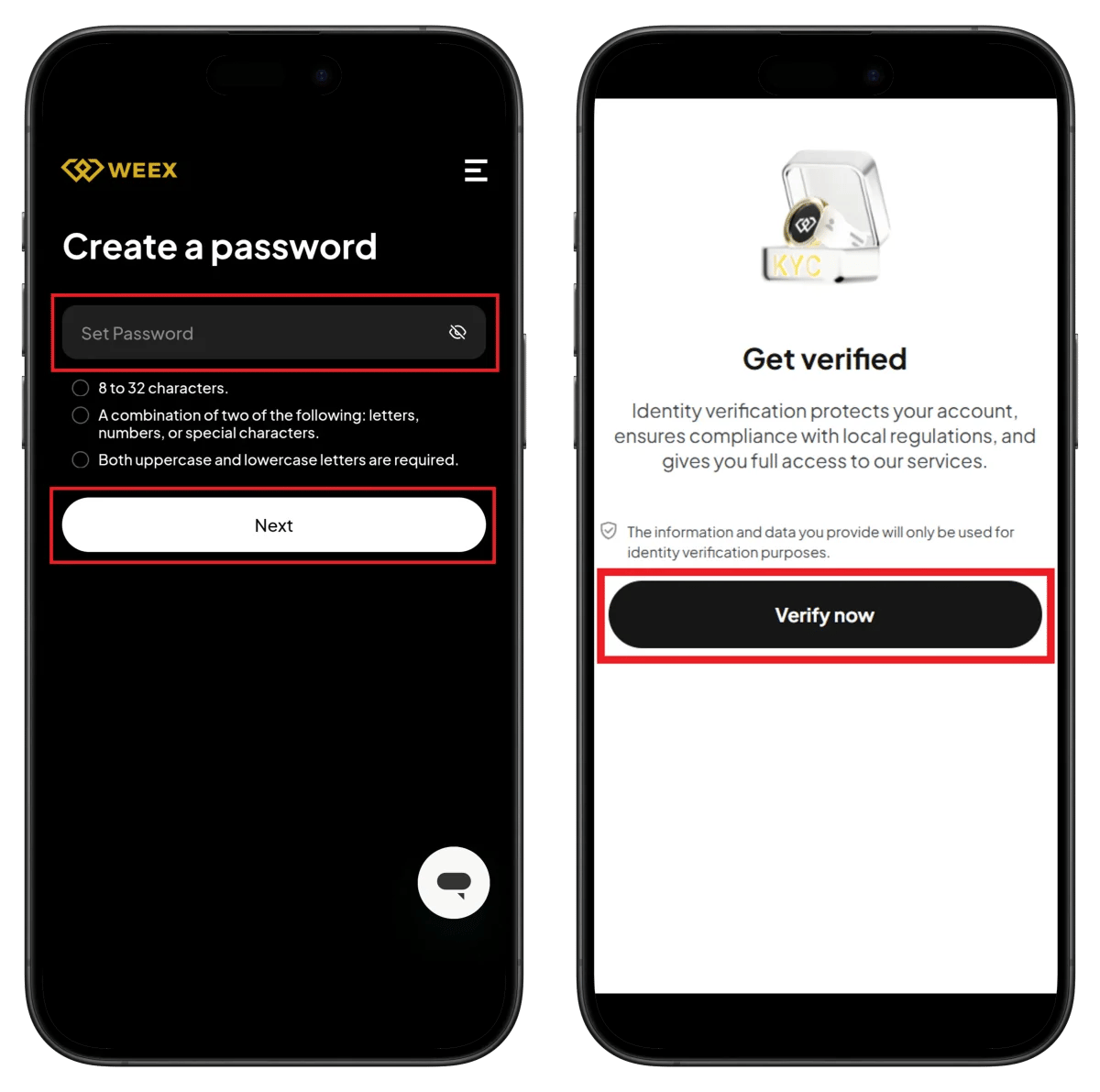
Left Screen - Create a password:
- Enter password in the Set Password field.
- Check password requirements:
- 8 to 32 characters
- A combination of two of the following: letters, numbers, or special characters
- Both uppercase and lowercase letters are required
- Click Next button.
Right Screen - Get verified:
- Identity verification protects your account, ensures compliance with local regulations, and gives you full access to our services.
- The information and data you provide will only be used for identity verification purposes.
- Click Verify now button.
Step 4: Start Sumsub Verification
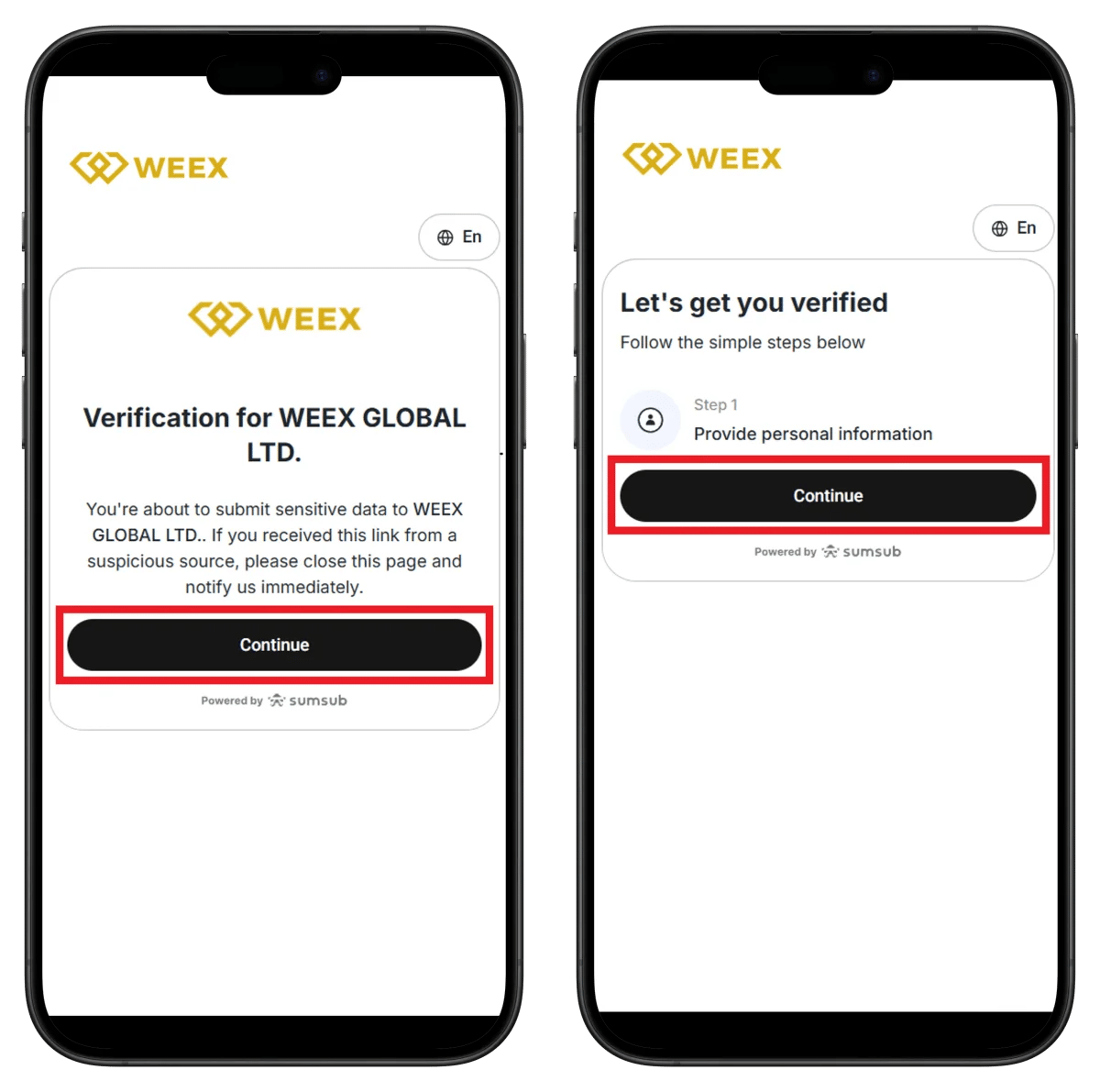
Left Screen - Verification for WEEX GLOBAL LTD.:
- sumsub logo is displayed.
- You're about to submit sensitive data to WEEX GLOBAL LTD.
- If you received this link from a suspicious source, close the page and report immediately.
- Click Continue button.
Right Screen - Let's get you verified:
- Check Follow the simple steps below guide.
- Step 1: Provide personal information - Enter your personal details.
- Click Continue button.
Step 5: Personal Information and Country Selection
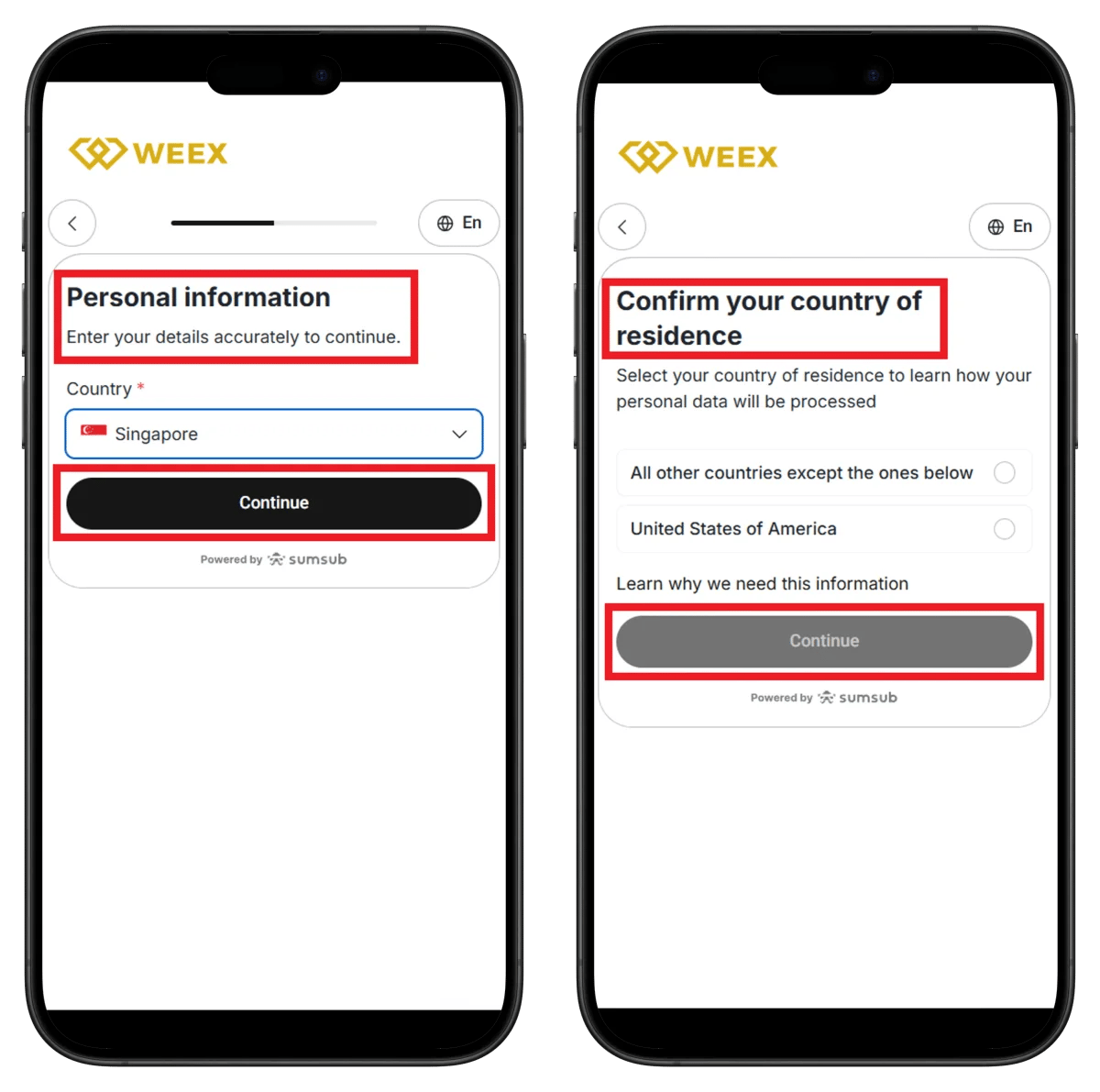
Left Screen - Personal information:
- Check Enter your details accurately to continue guide.
- Country - Select your country (e.g., Singapore).
- Click Continue button.
Right Screen - Confirm your country of residence:
- Select your country of residence to learn how your personal data will be processed
- Select your country of residence:
- All other countries except the ones below
- United States of America
- Check Learn why we need this information link.
- Click Continue button.
Step 6: Select ID Type

Left Screen - Let's get you verified:
- Check Follow the simple steps below guide.
- Check verification steps:
- Step 1: Provide identity document - Submit ID
- Step 2: Perform a liveness check - Face recognition
- You can select Speed up your verification with Sumsub ID option.
- Sumsub ID allows you to re-use your securely stored data to speed up the verification process
- Click Continue button.
Right Screen - Select type and issuing country:
- Issuing country - Select ID issuing country.
- Document type - Select ID type:
- Driver's license
- Identity Card / Resident registration card
- Residence Card / Alien registration card
- Passport
- Click Continue button.
Step 7: Upload ID and Complete Verification
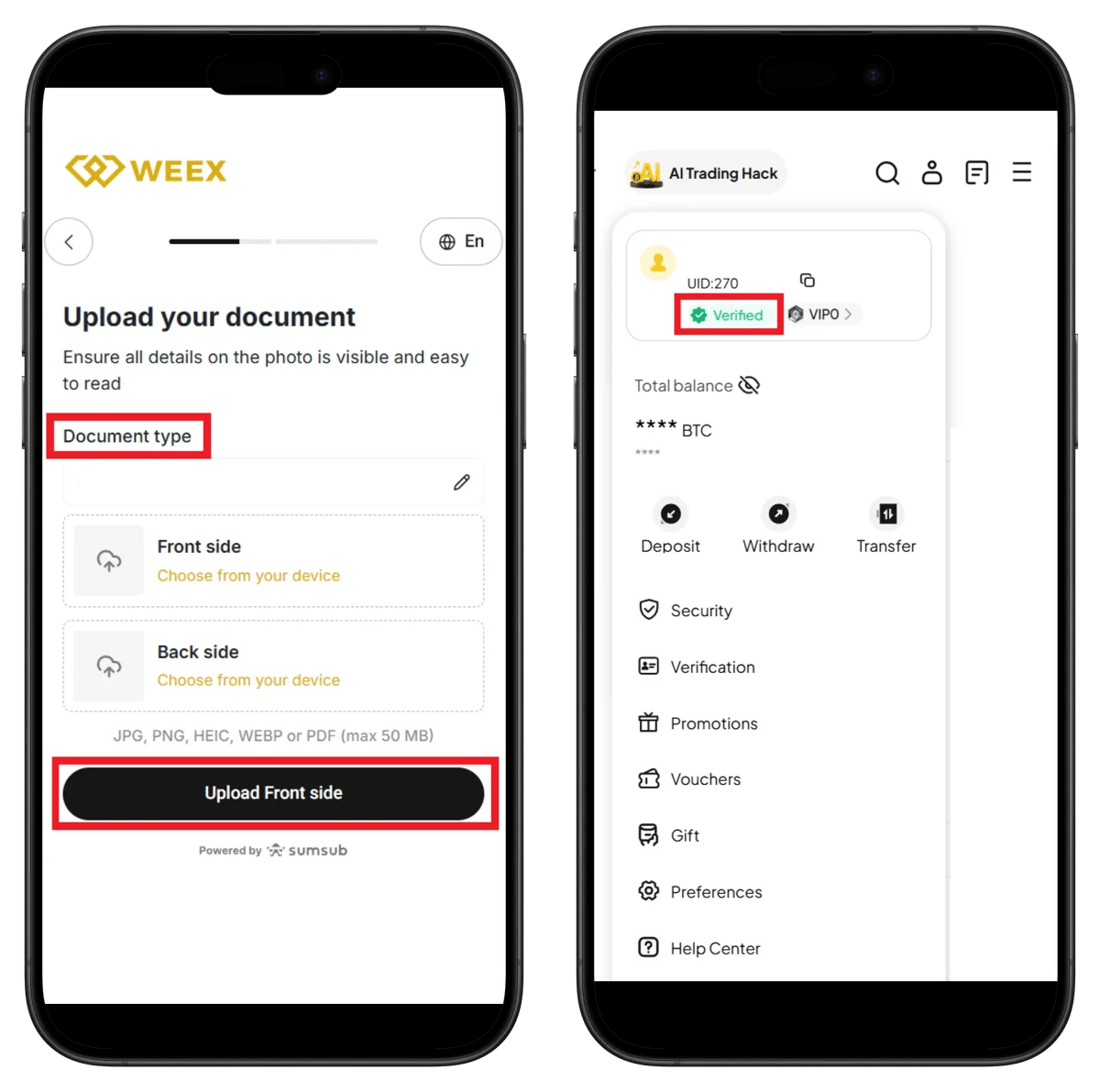
Left Screen - Upload your document:
- Ensure all details on the photo is visible and easy to read
- Document type - Check selected ID type.
- Front side - Click Choose from your device to upload front side.
- Back side - Click Choose from your device to upload back side.
- Supported formats: JPG, PNG, HEIC, WEBP or PDF (max 50 MB)
- Click Upload Front side button.
Right Screen - Profile (Verification Complete):
- AI Trading Hack is displayed at the top.
- UID: 270 - Check your account UID.
- Verified badge (green) is displayed.
- VIP0 tier is displayed.
- Total balance - Check account balance.
- Menu list:
- Deposit, Withdraw, Transfer
- Security
- Verification
- Promotions
- Vouchers
- Gift
- Preferences
- Help Center
How to Check WEEX UID
To connect cashback to TetherSave, you need your WEEX UID (Unique Identifier).
- Log in to WEEX app or web.
- Tap the profile icon.
- Check the UID number displayed at the top of your profile (e.g., UID:270).
👉 WEEX UID Check Detailed Guide
TetherSave Cashback Integration
- WEEX Sign Up - Sign Up
- TetherSave Sign Up - Sign Up
- Go to My Page → Exchange Connection menu
- Select WEEX
- Enter your UID
- Integration Complete!
Frequently Asked Questions (FAQ)
Q: How long does WEEX KYC verification take?
WEEX uses Sumsub automatic verification system, usually completed within a few minutes. Identity verification is done in real-time through Liveness Check.
Q: What are the benefits of signing up through TetherSave referral link?
Signing up through TetherSave allows you to receive cashback on a portion of trading fees. You can also use WEEX's AI Trading Hack feature.
Q: What should I do if my ID verification is rejected?
Check the rejection reason and resubmit with clearer photos. Files must be in JPG, PNG, HEIC, WEBP or PDF format and under 50MB.
Q: What types of ID does WEEX support?
You can use Driver's License, Identity Card (Resident registration card), Residence Card (Alien registration card), or Passport.
Q: What is Sumsub ID?
Sumsub ID is a feature that speeds up the verification process by reusing information previously verified with other services. It's optional and not required.
Written as of January 2026.
Related Posts

How to Sign Up for Gate.io (2026 Updated): Create a Cashback Account with KYC Verification

How to Sign Up for BingX (2026 Latest): Create a Cashback Account with KYC Verification