WEEX注册教程完全指南2026 - 返现连接全攻略

📚 按分类浏览
WEEX注册完全指南2026
正在寻找如何注册WEEX?
本文详细介绍2026年最新的WEEX注册流程、KYC身份认证以及TetherSave返现连接的完整过程,配有实际截图。
WEEX注册准备
1. 电子邮箱或手机号码
- WEEX注册需要有效的邮箱或手机号
2. 身份证件(KYC认证用)
- 护照(推荐)
- 驾驶执照
- 身份证(Identity Card / Resident registration card)
- 居住证(Residence Card / Alien registration card)
3. 智能手机
用于身份证拍摄和活体检测。
WEEX注册步骤(分步指南)
第1步:访问TetherSave专属注册链接
通过此链接注册将自动连接TetherSave返现优惠。
第2步:输入邮箱并验证
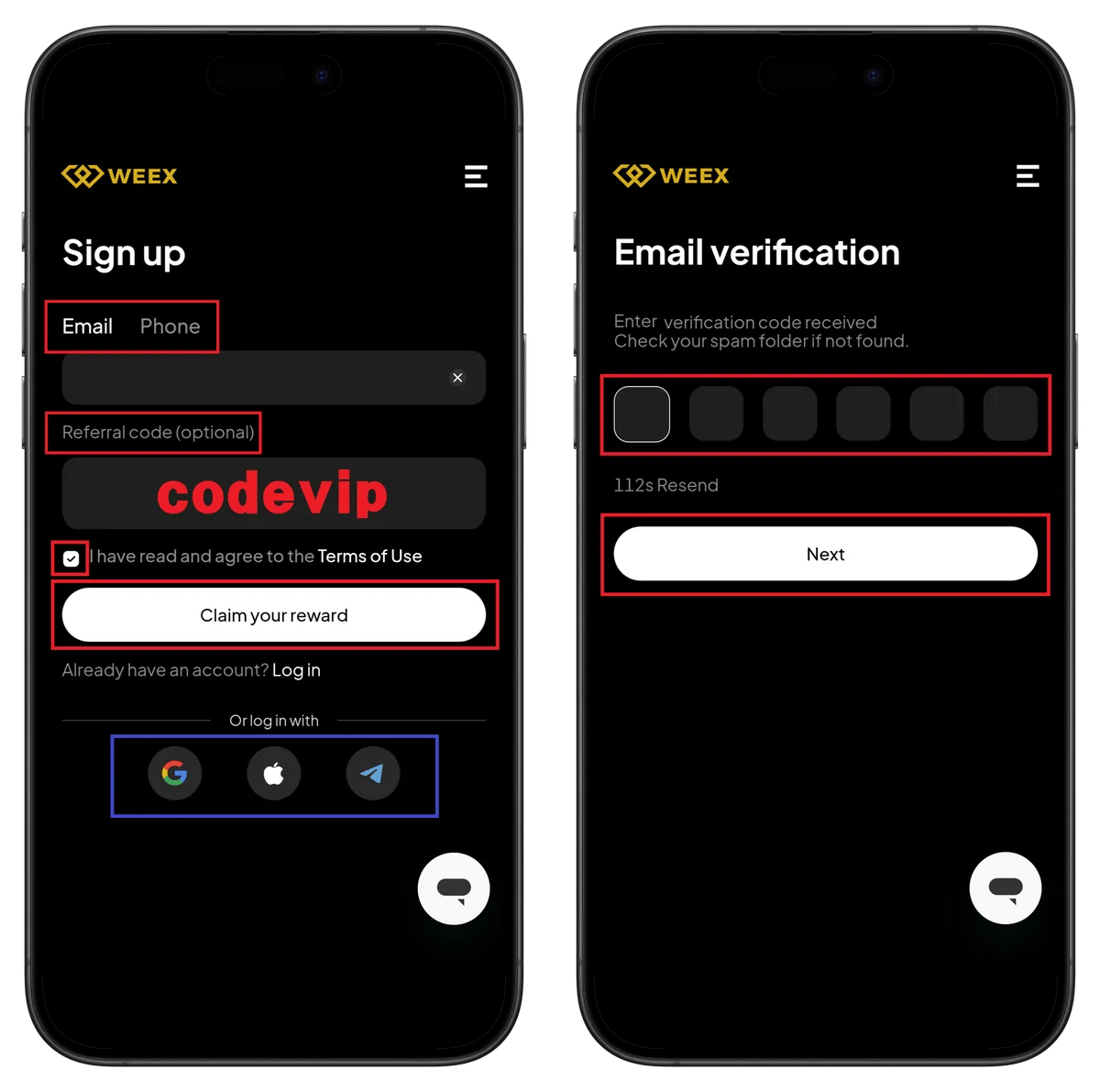
左侧界面 - Sign up:
- 选择Email或Phone标签。
- 输入邮箱地址。
- Referral code (optional) - 请务必确认邀请码vipsave!
- 勾选Terms of Use同意条款。
- 点击Claim your reward按钮。
- 可通过Already have an account? Log in链接登录。
- 也可使用Google、Apple或Telegram注册。
右侧界面 - Email verification:
- 在Enter verification code received字段输入验证码。
- 查看Check your spam folder if not found提示。
- 112s Resend - 显示重发等待时间。
- 点击Next按钮。
第3步:设置密码并开始KYC
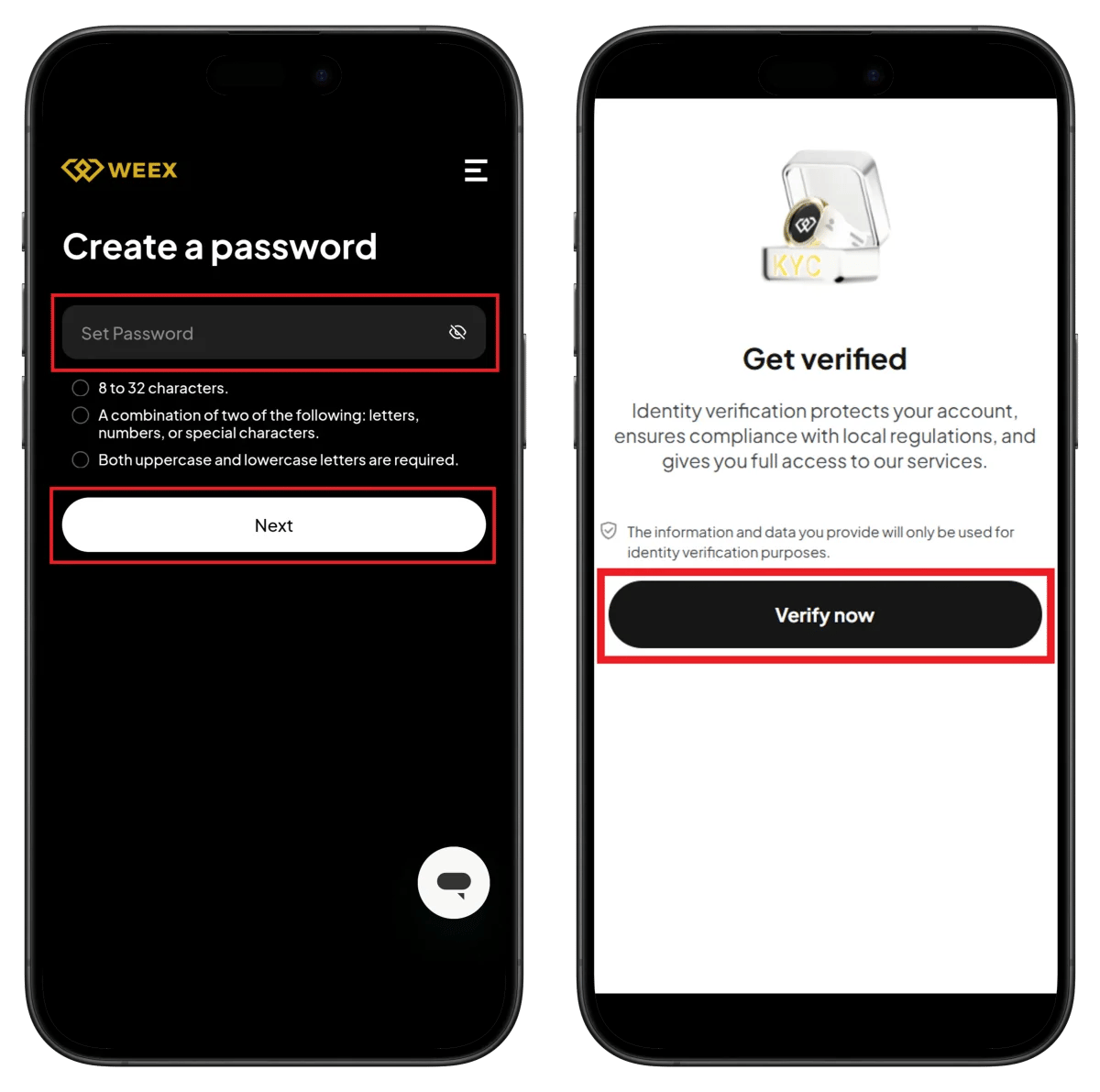
左侧界面 - Create a password:
- 在Set Password字段输入密码。
- 确认密码要求:
- 8至32个字符
- 字母、数字或特殊字符中至少两种组合
- 需要大小写字母
- 点击Next按钮。
右侧界面 - Get verified:
- Identity verification protects your account, ensures compliance with local regulations, and gives you full access to our services.
- The information and data you provide will only be used for identity verification purposes.
- 点击Verify now按钮。
第4步:开始Sumsub验证
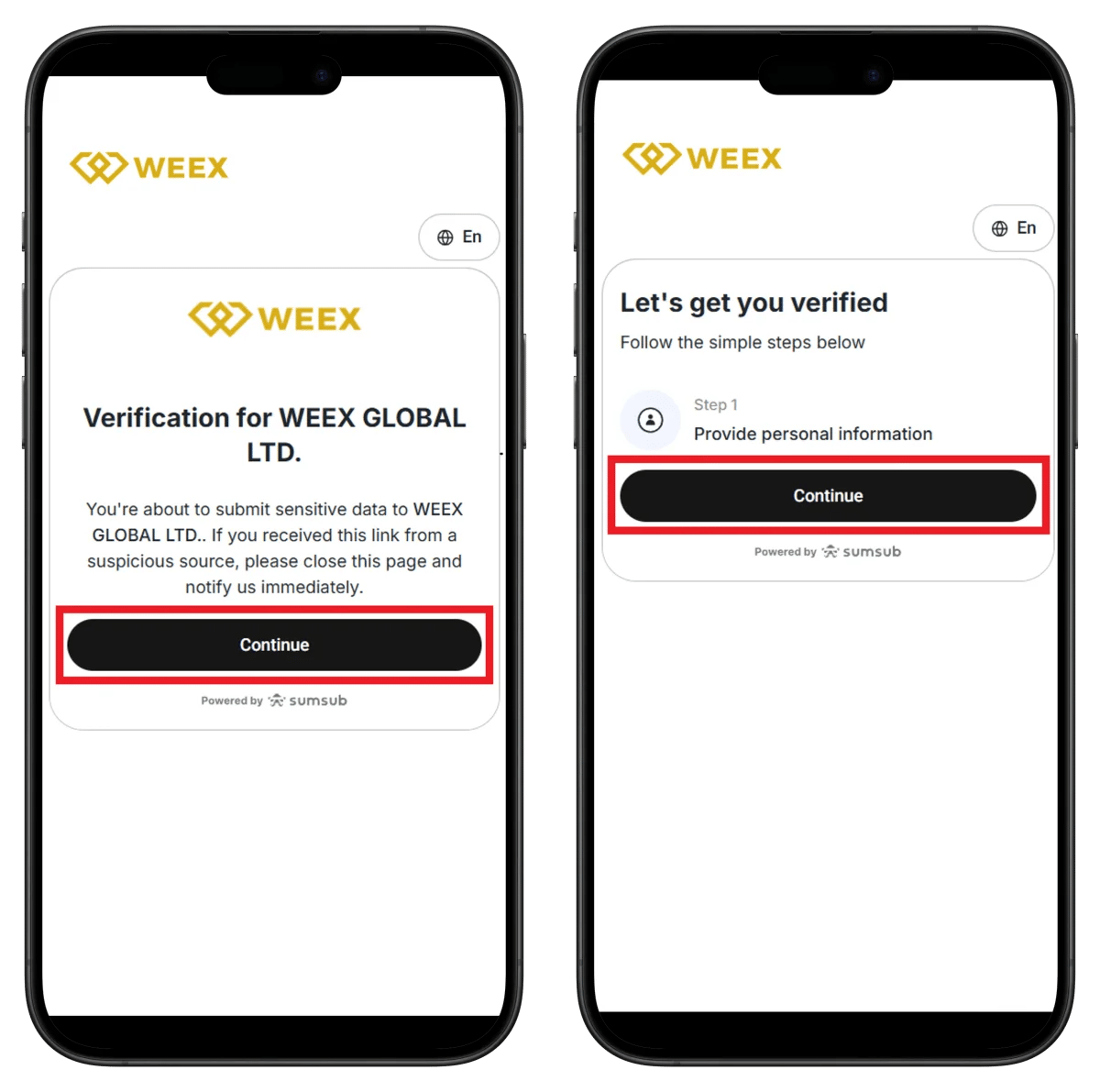
左侧界面 - Verification for WEEX GLOBAL LTD.:
- 显示sumsub标志。
- You're about to submit sensitive data to WEEX GLOBAL LTD.
- 如果从可疑来源收到此链接,请关闭页面并立即报告。
- 点击Continue按钮。
右侧界面 - Let's get you verified:
- 查看Follow the simple steps below指南。
- Step 1: Provide personal information - 输入个人信息。
- 点击Continue按钮。
第5步:个人信息和国家选择
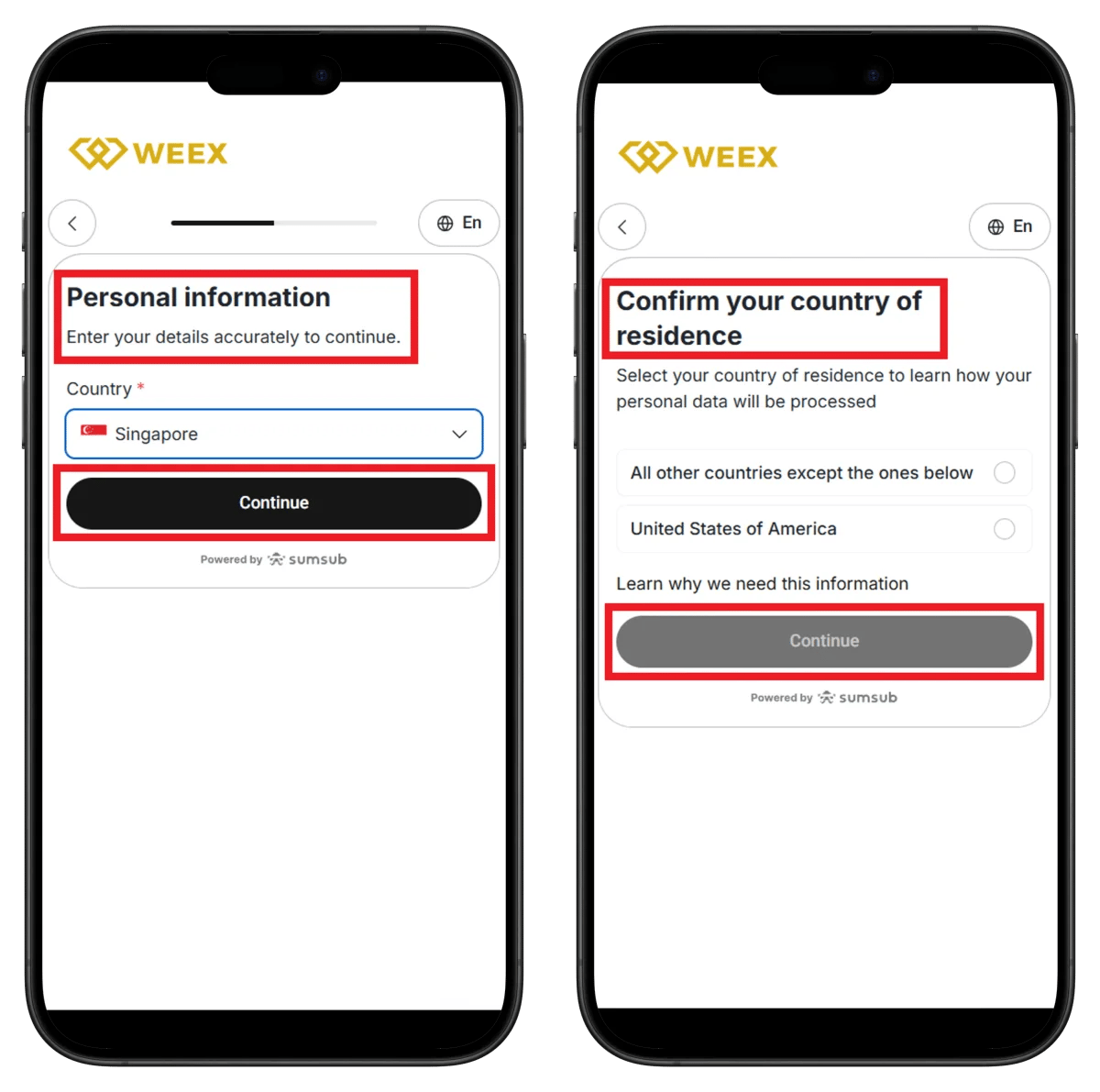
左侧界面 - Personal information:
- 查看Enter your details accurately to continue指南。
- Country - 选择国家(如:Singapore)。
- 点击Continue按钮。
右侧界面 - Confirm your country of residence:
- Select your country of residence to learn how your personal data will be processed
- 选择居住国:
- All other countries except the ones below
- United States of America
- 查看Learn why we need this information链接。
- 点击Continue按钮。
第6步:选择证件类型

左侧界面 - Let's get you verified:
- 查看Follow the simple steps below指南。
- 确认验证步骤:
- Step 1: Provide identity document - 提交证件
- Step 2: Perform a liveness check - 人脸识别
- 可选择Speed up your verification with Sumsub ID选项。
- Sumsub ID允许重复使用安全存储的数据加速验证过程
- 点击Continue按钮。
右侧界面 - Select type and issuing country:
- Issuing country - 选择证件签发国。
- Document type - 选择证件类型:
- Driver's license
- Identity Card / Resident registration card
- Residence Card / Alien registration card
- Passport
- 点击Continue按钮。
第7步:上传证件并完成验证
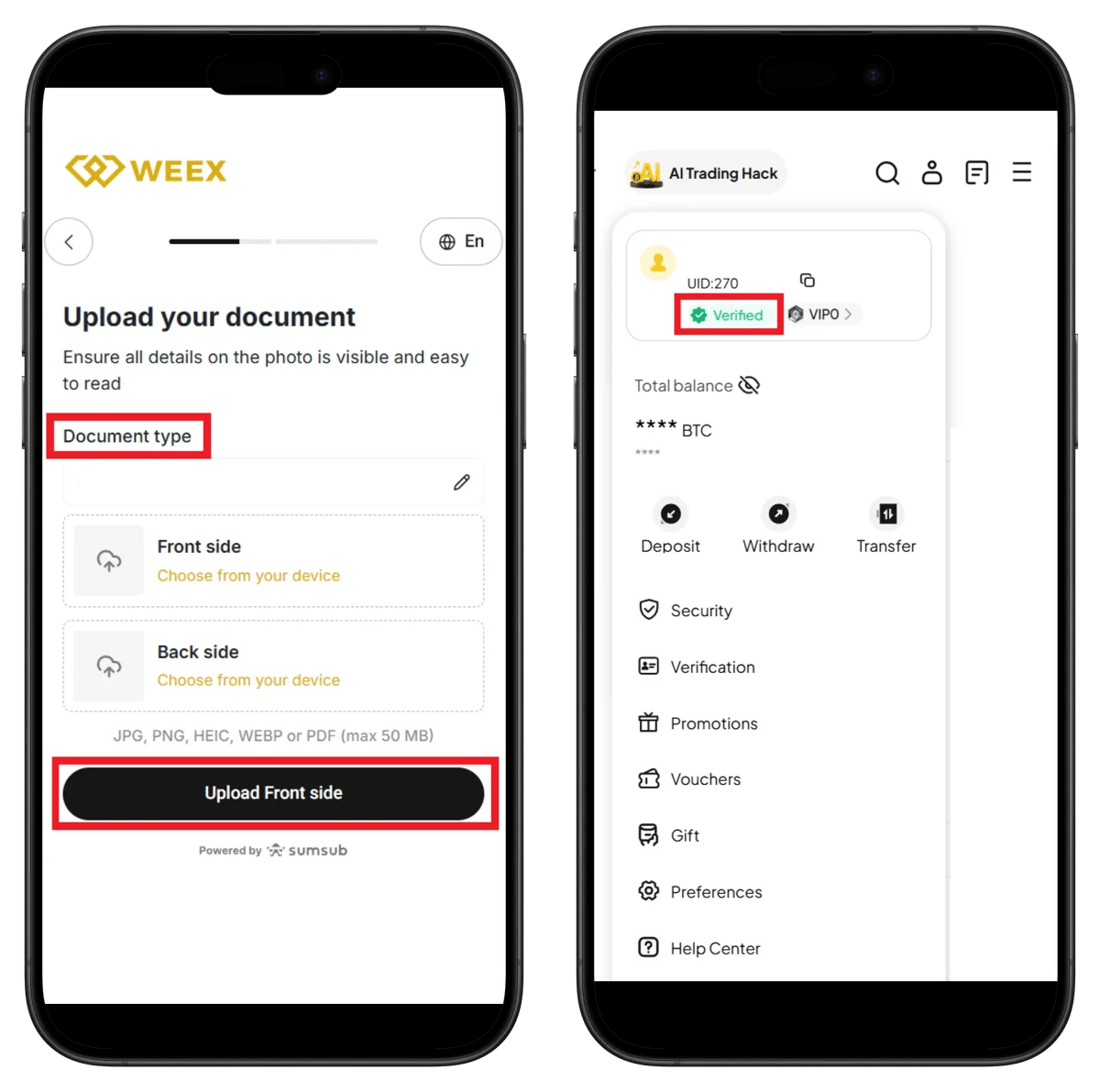
左侧界面 - Upload your document:
- Ensure all details on the photo is visible and easy to read
- Document type - 确认已选择的证件类型。
- Front side - 点击Choose from your device上传正面。
- Back side - 点击Choose from your device上传背面。
- 支持格式:JPG, PNG, HEIC, WEBP or PDF (max 50 MB)
- 点击Upload Front side按钮。
右侧界面 - 个人资料(验证完成):
- 顶部显示AI Trading Hack。
- UID: 270 - 确认账户UID。
- 显示Verified徽章(绿色)。
- 显示VIP0等级。
- Total balance - 查看账户余额。
- 菜单列表:
- Deposit, Withdraw, Transfer
- Security
- Verification
- Promotions
- Vouchers
- Gift
- Preferences
- Help Center
WEEX UID查看方法
连接TetherSave返现需要WEEX UID(唯一识别码)。
- 登录WEEX应用或网页。
- 点击个人资料图标。
- 确认个人资料顶部显示的UID号码(如:UID:270)。
TetherSave返现连接方法
常见问题(FAQ)
Q: WEEX KYC认证需要多长时间?
WEEX使用Sumsub自动认证系统,通常在几分钟内完成。通过活体检测实时进行身份验证。
Q: 通过TetherSave推荐链接注册有什么好处?
通过TetherSave注册可以获得交易手续费部分返现。还可以使用WEEX的AI Trading Hack功能。
Q: 如果证件认证被拒绝怎么办?
查看拒绝原因并用更清晰的照片重新提交。文件必须是JPG、PNG、HEIC、WEBP或PDF格式,大小不超过50MB。
Q: WEEX支持哪些证件类型?
可以使用驾驶执照、身份证(Identity Card/Resident registration card)、居住证(Residence Card/Alien registration card)或护照。
Q: 什么是Sumsub ID?
Sumsub ID是一项功能,可以重复使用之前在其他服务中验证过的信息来加速验证过程。这是可选的,不是必需的。
撰写于2026年1月。